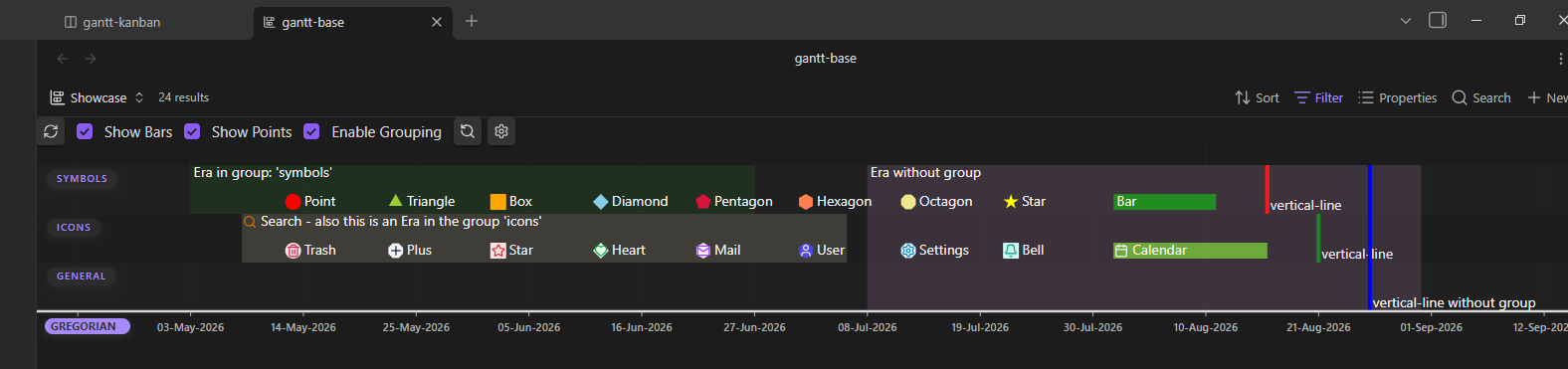
This screenshot shows all possible types of events including some randomly chosen icons.
In the chart, each element above the calendar axis represents an event defined in a Markdown note.
Features & Structure
- Events: Each point or bar in the timeline corresponds to an event. Events are split into timestamps and timespans.
- Bars: Represent time spans.
- Points / Symbols: Represent specific points in time or milestones.
- Decentralized in Frontmatter: Events are defined directly within the YAML properties of your Markdown files.
- Structuring: Events can be organized, filtered, and sorted by groups and custom calendars.
- Flexible Visibility: Groups, calendars, time spans, and individual points can be shown or hidden independently.
- Custom Styling: Points in time can be customized with icons from Obsidian’s cache and custom colors.
- Interactivity:
- Mouseover displays relevant metadata in a tooltip (Desktop).
- Clicking an event directly opens the source note—optionally jumping to a specific heading.
- Full navigation via drag & zoom (mouse wheel on Desktop, touch gestures on mobile devices).
Event Property Overview
The following table lists all available properties you can use in your notes:
| Property | Type | Mandatory | Description | Fallback |
|---|---|---|---|---|
| calendar-definition | String | Yes* | Marks a note as calendar definition. | None |
| gantt-item | Boolean | Yes** | Marks a note as event definition. | true |
| gantt-calendar | String | No | Determines the assigned calendar type. | Calendar for this event |
| gantt-name | String | No | Name of the event. | Filename, without extension |
| gantt-start | String | Yes | Start date of the event. | None |
| gantt-end | String | No | End date of the event. | Value of gantt-start |
| gantt-symbol | String | No | Shape of event. | bar (timespan) / point (timestamp) |
| gantt-color | String | No | Color of the event shape. | Group color → Calendar color → Default |
| gantt-group | String | No | Group of event. | 'general' |
| gantt-displayIcon | String | No | ID of SVG icon, added to event shape. | None |
| gantt-displayIconColor | String | No | Color used for SVG icon. | Default icon color |
| gantt-linkToHeader | String | No | Note heading linked to by event. | None (Jumps to top of file) |
| gantt-predecessors | list | No | Predecessors of event. | None |
| gantt-succesors | list | No | Successors of event. | None |
*: Property gantt-calendar-definition marks and holds a calendar definition.
See: calendars
**: Property gantt-item may be set to optional in the settings.
All of these can be renamed to your liking.