Events can be displayed using different shapes.
The frontmatter property gantt-symbol customizes individual event markers.
Supported values include standard geometric shapes.
Timestamp Shapes
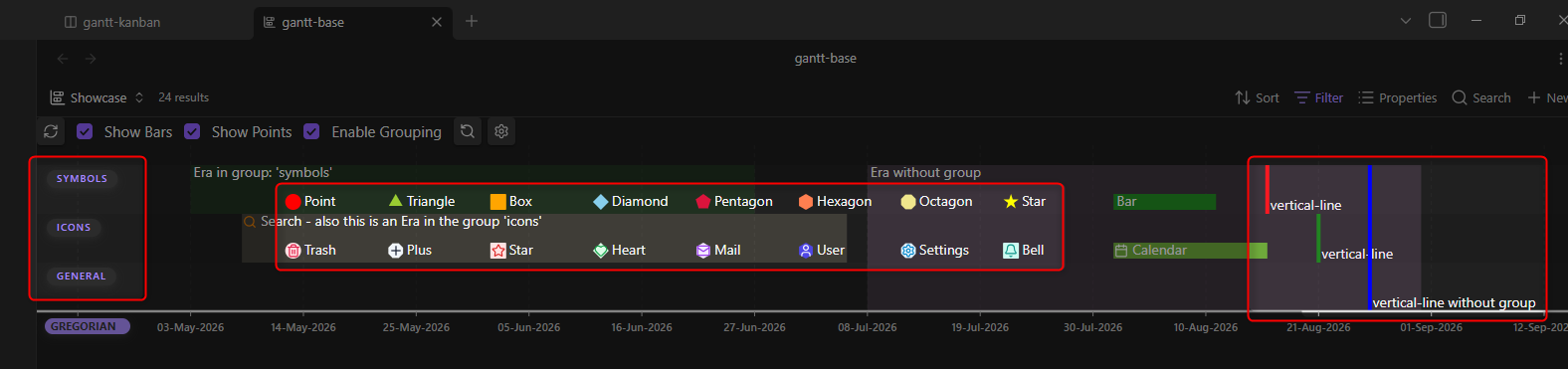
Reminder: Timestamp events are defined by adding a start-date to any event. Omit the end-date or leave it empty.
There are 8 different shapes usable for timestamp events. All of these function the same way, only the SVG graphic changes. See the central box of the screenshot.
point(default) |triangle|box|diamond|pentagon|hexagon|octagon|star
But they were all betrayed - for a ninth symbol was made to betray them all. See right box of the screenshot. This symbol was added to create separators and/or markers for special days like today.
Similar to era, it spans the entire height when not placed into a specific group.
vertical-line
Timespan Shapes
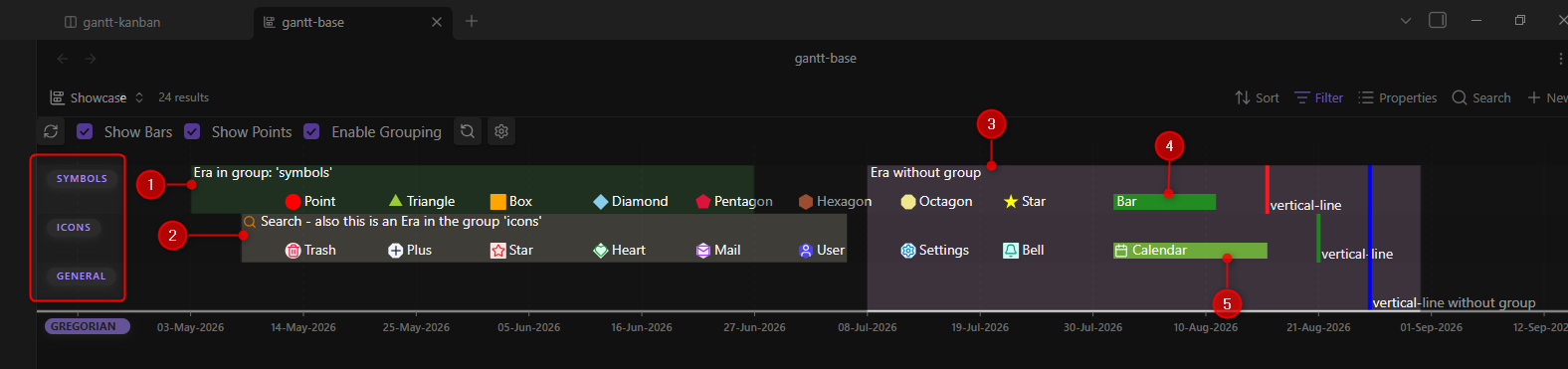
Reminder: Any event with start- and end-date properties is defined as a timespan.
There are two types of timespan events:
-
bar: Bars are shown as horizontal rectangles. See markers (4) and (5) in the screenshot: (4) is named “Bar” and set into groupsymbols, while (5) is placed into groupicons. -
era: Eras are shown as semi-transparent rectangles behind all other events. They can be placed in a group or span the entire height of the chart (if no group is defined). See markers (1), (2) and (3) in the screenshot. (1) is placed in groupsymbols, (2) insideicons, while (3) has no group.
Examples
---
gantt-start: 2026-08-27
gantt-symbol: diamond # Omit property to use default shape (configured in Plugin Settings)
---

---
gantt-start: 2026-08-27
gantt-end: 2026-08-30
gantt-symbol: era # Omit property to use default shape (bar)
---
Property traits
- This property is of type
text; its usage is optional.- You can rename it to your liking, see Plugin Settings > Event Frontmatter Properties.