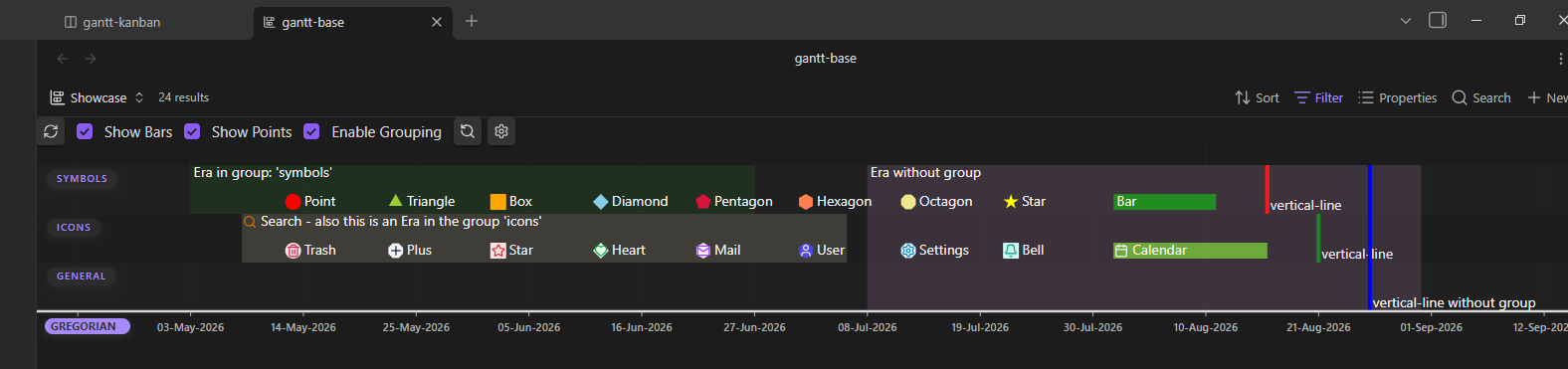
Events can be organized into groups. Groups are displayed on the left side of the Gantt chart.
The frontmatter property gantt-group assigns an event to a designated row.
In the example above, events are categorized into the symbols, icons, and general groups.
Tip
- Events of type
eraorvertical-linenot given a group will span the entire height of the chart, as seen on the right side of the showcase.- Other events lacking a group will be placed into the group
general.
Managing groups
Groups can be managed in the Plugin Settings > Groups. This is optional, but doing so allows you to:
- Reorder groups by priority.
- Set a default color for all events in a specific group.
- Toggle visibility for an entire group.
Examples
---
gantt-group: "Frodo and Sam's path"
---

---
gantt-color: "Weekly tasks"
---
Property traits
- This property is of type
text; its usage is optional.- You can rename it to your liking, see Plugin Settings > Event Frontmatter Properties.